
Gates that learn from every failure
Gate Intelligence analyzes your validation history to find patterns, detect fixable issues, and suggest concrete improvements. Your gates get smarter over time — automatically.
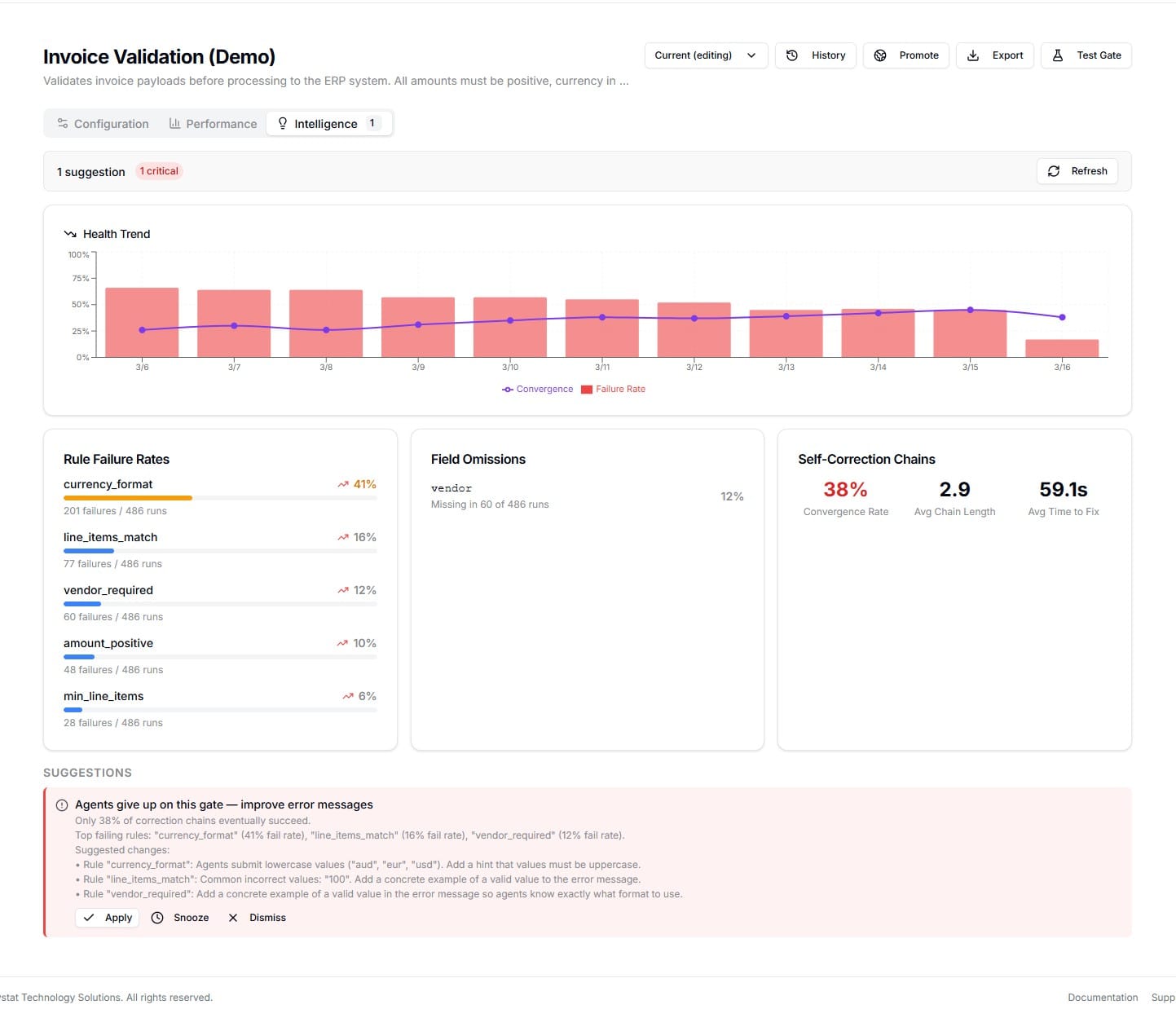
When 60% of agents fail the same rule, the gate should tell you why
Every run Flow processes is stored — payloads, verdicts, per-rule results, failure values, correction chains. Gate Intelligence turns that data into concrete suggestions so you fix the root cause, not the symptoms.
"Currency format rule fails a lot."
"Some agents keep retrying."
"Not sure what to change."
"Currency format fails 42% — agents submit lowercase (usd, eur, gbp)."
"Only 33% of correction chains converge. Avg 4.2 attempts, 38s."
"Add: Currency must be uppercase ISO 4217." → Apply with one click.
What it analyzes
Intelligence runs hourly on every active gate, analyzing the last 7 days of validation data.
See which rules fail most often, with trend arrows showing whether things are getting better or worse compared to the previous period.
Not just "rule X fails" — see the actual values agents submitted. "usd" instead of "USD", 99.999 instead of 100.00, empty strings where a name should be.
Required fields that agents frequently forget. If 38% of submissions are missing the vendor field, your gate should make that more obvious.
When agents fail and retry, do they eventually get it right? A 33% convergence rate means your automation succeeds less than a third of the time.
It tells you why, not just what
Intelligence examines common failure values and classifies them into fixable patterns — so suggestions are specific, not generic.
Case Mismatch
Detected: "usd" submitted where "USD" is expected
Suggestion: Add case guidance or normalize input
Rounding Tolerance
Detected: 99.999 fails an exact equality check against 100.00
Suggestion: Add tolerance (e.g., abs(diff) < 0.01)
Type Coercion
Detected: String "42" submitted where number 42 is expected
Suggestion: Add type guidance to error messages
Empty String
Detected: "" submitted where a non-empty value is required
Suggestion: Clarify field requirements in description
From insight to agent behavior
Suggestions don't just sit in a dashboard. They flow through a version-controlled pipeline that changes what agents see.
Analyze
Intelligence detects that agents submit lowercase currency codes 42% of the time.
Suggest
A critical suggestion appears: "Add: Currency must be uppercase ISO 4217."
Version
Click Apply — the hint is added to a draft. Review, edit, publish when ready.
Enforce
Agents see the hint in the MCP tool description. First-attempt success rate improves.
Severity-based prioritization
Not all insights are equal. Intelligence prioritizes by impact so you fix the biggest problems first.
Rule fails >50% of first attempts, or chain convergence below 50%
These are blocking your automation. Fix them first.
Required field missing >30% of the time
Agents don't realize a field is required, or the field name isn't clear enough.
Redundant rules or excellent performance
A rule with 0 failures in 500+ runs may be removable. All rules passing >95%? Your gate is well-tuned.
Track improvement over time
Each hourly analysis saves a snapshot. The Health Trend chart shows failure rates (bars) and convergence (line) over time — so you can see whether applying suggestions actually improved your gate's success rate.
Red bars (>50% failure) transitioning to green (<20%) after applying hints is the signal that your gate is learning.
Stop guessing, start improving
If your agents need five attempts and 45 seconds to pass a rule that a single hint would fix on the first try, the gate is the bottleneck. Intelligence gives you the data to fix that.